Using Dependency Injection with Selenium, .NET Core 6 and NUnit — Part 1
Learn how to leverage Microsoft's Dependency Injection, Selenium 4 and NUnit to create a maintainable test automation framework with proper architecture and conventions.
Automation testing in large enterprises is often handled at a modular level by different teams. Each team is responsible for the module assigned to them. This strategy is helpful when automating large applications. It is essential to create a test automation framework which is simple, robust and unobtrusive for different teams. This allows you to add and maintain the automation tests with minimal effort. If the framework isn’t well written, we may end up adding more complexity overtime. A good test framework helps organizations of all sizes effectively automate tests.
In this article, we will leverage Microsoft’s Dependency Injection, Selenium 4 and NUnit, to create a maintainable test automation framework. To get started, you should have good knowledge of C# language, and a fair understanding of SOLID principles and .NET Core. If not, I suggest you check the links at the end of this article.
We will mostly stick to .NET built-in modules or nugets from Microsoft. In this part, we will have a look at how to setup the solution, configuration files and use Microsoft DI container to inject IWebDriver in tests. Later, we will use this framework to write some tests for an Automation Practice site. Let’s get started!
Source Code
The source code for this project is publicly available at GitHub. The repository contains article_support_code folder which has the solution. The repository has a main branch and part1 branch. Main branch will contain the updated code, and each part* branch will contain code of the previous part and the current part. I use JetBrains Rider/VS2022+ReSharper. For the purpose of this article, you can use VS Code or Visual Studio 2022. When you open the solution you will find 3 projects shown below:
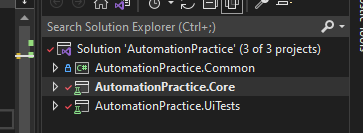
Project Structure
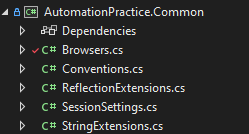
- AutomationPractice.Common contains supporting classes and methods which can be re-used in all projects.
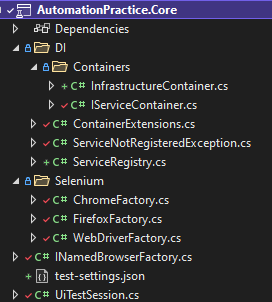
- AutomationPractice.Core contains all the infrastructure and core automation framework classes. We will eventually add custom test attributes and test reporting generation logic also.
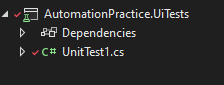
- AutomationPractice.UITests will eventually contain the tests for the application.
Overview
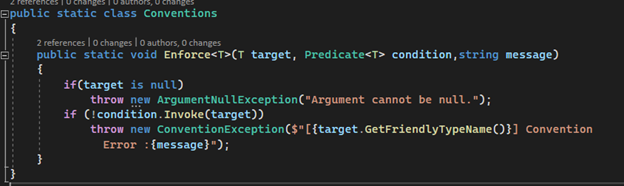
In this framework, we will strongly follow standard conventions rather than configuring every class. You will see Conventions Class with Enforce Method, which throws ConventionException if any convention is broken. Enforcing conventions like naming conventions, namespace or constructors etc. on a set of classes preserves the structure of the code overtime. This promotes reusability and reduces effort. By reusability, I am not only referring to code reuse, but something much broader like reusability of structure, reusability of people and experience too.
Dependency Injection
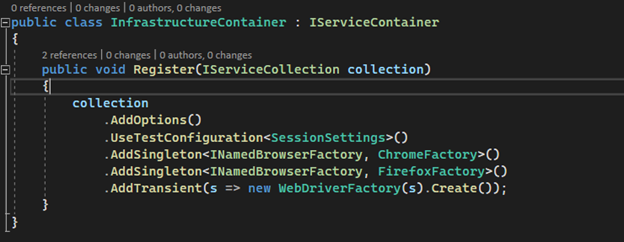
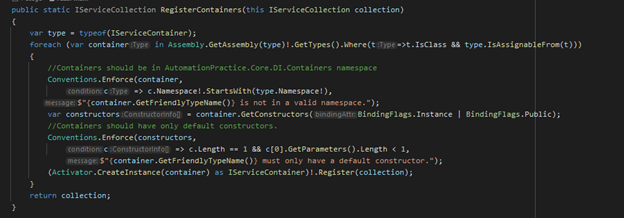
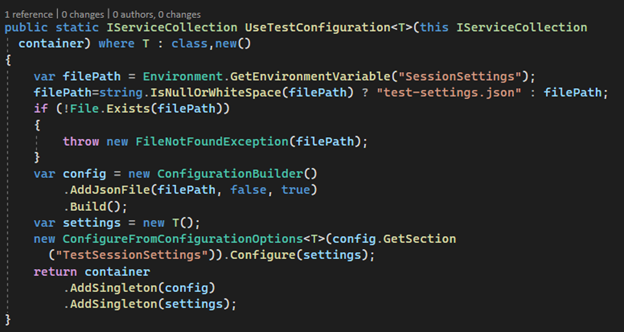
The DI container in this framework is designed to enable multiple teams to manage their dependencies on tests. Every module will have its own implementation of IServiceContainer and all the concrete implementations have to be in AutomationPractice.Core.DI.Containers namespace. The framework will automatically inject the dependencies which are in this namespace. To demonstrate this, I have added InfrastructureContainer class, which adds infrastructure related services to DI Container.
I have also demonstrated Extension method approach (UseTestConfiguration) to achieve the same goal (if all extension methods are in different classes in respective module). You can use either of the two approaches. All the containers or required services will be eventually added to ServiceRegistry class which creates a ServiceProvider. The service provider is passed to the UiTestSession class, which will be used throughout the UiTests project to get the required objects.
Configuration
Handling configuration in any test project often depends on an organization or a project. For the purpose of this demo, we will assume that the cloud VM’s which run the tests have an environment variable storing the path of a test-setting.json file. And for local development/debugging we will have a fallback json file which no body is allowed to push to remote branches with credentials. This is what the file looks like.
NOTE: To ease debugging, I have moved drivers away from the bin folder.
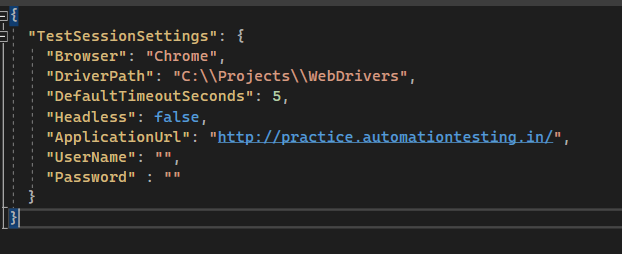
This file will be parsed to ConfigurationRoot object using the ConfigurationBuilder class. And ConfigureFromConfigurationOptions class binds it to SessionSettings object. This enables us to inject it directly from the constructor without using IOptions<T> interface (Options pattern).
Implementing WebDriver Factory
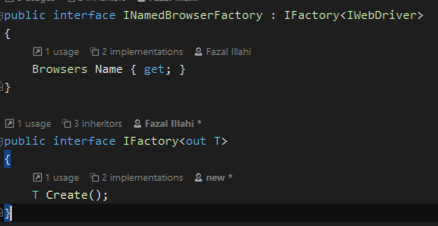
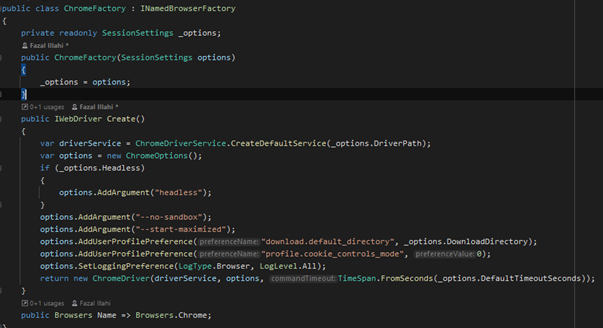
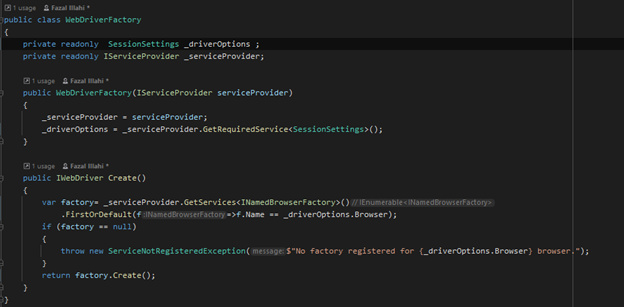
The implementation uses Factory Method design pattern to initialize concrete instances of the web driver depending on the configuration. All the concrete driver factories need to implement INamedBrowserFactory Interface and distinct browser name (Browsers enum). The concrete factory is called by the wrapper factory class WebDriverFactory to resolve IWebDriver to a configured browser type. If you have worked with factory method design pattern, the code below should be easy to understand.
Given below are the factory interfaces.
Here is the implementation for Chrome WebDriver Factory:
The wrapper factory class given below calls the correct factory to create the instance of WebDriver.
UiTestSession class would be our go to class to resolve the services or store test session data or settings. We will later refactor this class to separate different responsibilities it has to take care of. Eventually this class will be composed of different objects which will have their own responsibilities.
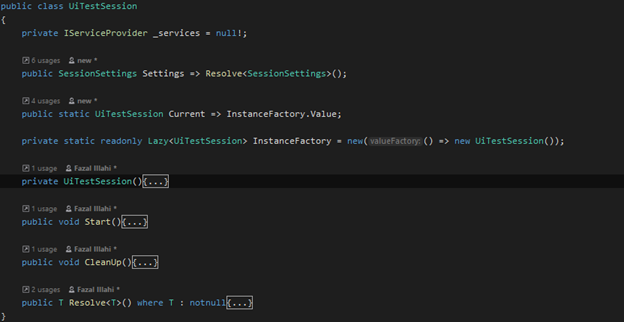
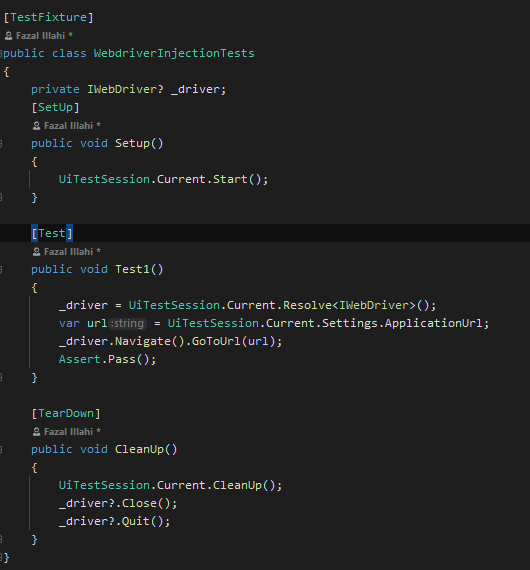
Start method should be called when the test session is started. We need to preferably call this somewhere in OneTimeSetUp method. Once the Start method is called, we can ask the session to resolve the required page or WebDriver or any service needed in the tests. To get an object of the WebDriver in the tests, we use the Resolve method as shown below.
I hope you find this article useful. See you in Part 2.