Using Dependency Injection with Selenium, .Net Core 6 and NUnit — Part 2
Implement NUnit loggers, Waits and PageObjects with dependency injection. Explore patterns and anti-patterns for efficient UI test automation and better page object design.
In the last part we saw how we can inject IWebDriver in tests. In this part we will see how we can implement NUnit loggers, Waits and PageObjects and inject them in tests using the Resolve method we used to inject IWebDriver in tests. We will also have a look at some of the patterns and anti-patterns in this article and leave the design choices to you. There are a couple of ways through which a task can be achieved. Knowing more than one approach will help us take proper decisions for different use cases. Every application poses a different testing/designing challenge. I will try to cover a few in this article as we go along. And leave some hints for you to experiment with the framework features, not covered in this article. Let’s get started.
Test Reporting
There are some fantastic test reporting plugins we can use. In this article I will not show how to use one of those. I think that is beyond the scope of this article. But the code for this part will give us some hints on how we can implement our own reporting framework if needed. I have added UiTestAttribute and exposed some Internal NUnit framework Properties in UiTestSession class. I encourage you to check the values of the properties in Watch/Intermediate Window while debugging any test.
Cross Browser Testing | Selenium Grid
I have skipped this topic altogether though with some minor changes in the factories we can easily support it. But if you want me to write an article about Selenium Grid, feel free to leave a comment.
Logging
Test logging is an important characteristic of any test automation framework. Logs not only help developers to quickly identify bugs but also help QA team to report bugs and resolve broken automation scripts without much debugging. For this demo, I have just implemented a simple console logger. We can use it as a boilerplate to write a logger as per our needs.
WebDriver/Page Life Cycle
We need to decide how we want the WebDriver or page object initialization to occur. The DI container we are using allows us to register Singleton, Scoped and Transient services. If we want to initialize the WebDriver only once throughout the test session, then the implementation is easiest. We just need to register IWebDriver as Singleton to see the expected behaviour. Things get tricky when we want a test method or a test class to reuse active WebDriver instance. But I will take a neutral approach instead of keeping things too simple. Since this approach works best with BDD too, I will reuse one page for an entire test class. And return objects of other pages from the methods as we can see the OpenShop (or similar) method returns an object of ShopPage. The UiTestBase class will resolve the instance of the page. In most cases that should just work fine. The other ways of managing the lifetime of the WebDriver or a WebPage which includes implementing custom ITestAction/ICommandWrapper (or like) NUnit attributes to handle Scoped IWebDriver Service or using NUnit lifecycle attributes to handle IWebDriver. I think that it will require an article series on ‘Extending NUnit’.
Better Page Objects
Before jumping to injecting page objects in test scripts, let’s discuss what they are and how to write page objects. This will help a great deal, and this is where an automation engineer utilizes most of his/her billable time. Having said that let’s try to understand.
A Page Object is an abstraction layer over a UI component or a group of components or an entire screen exposing application specific API. These are aimed at hiding the low-level Selenium API and just expose the application specific behaviours e.g., PlaceOrder, Login, SignUp, AddToCart etc. This helps us write readable and reliable tests by removing the dependency from tests on brittle UI changes and promotes code reuse. I won’t ramble about the benefits of POM. I am sure you know that. It is important that page objects must expose application specific behaviours (functions/methods) instead of the actual implementation of the behaviour. If test scripts contain those waits or Thread.Sleep, then those page objects are no better than WebDriver or WebElement in the test scripts. The test library (.dll) should not refer Selenium libraries (.dll) directly.
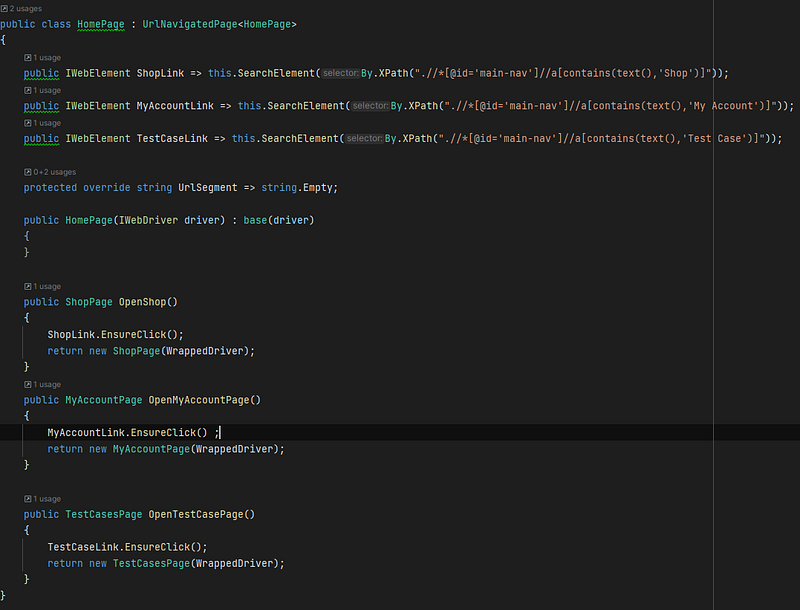
Code reuse in any class does not necessarily have to come from inheritance. We must look at alternate approaches to reuse the code. Function Overloading, Composition, Utility Classes, Extension methods and by implementing Selenium Interfaces, we can also reuse code. Below are certain things I keep in mind while using the different approaches. You can disagree with me and it’s OK. Please leave a comment if you think otherwise. I would love to know your thoughts and learn from you.
Utility Classes
I prefer these classes to be internal static. The methods in these classes should be atomic or must have one and only one responsibility with just a few lines of code say up to 10 lines generally. e.g., We want to check if browser URL matches a regex pattern. Or we want to check if we can interact with a web element. We can put these methods in utility classes. API’s (Class Libraries) use such classes or methods internally very often. We must ensure that these methods should not be exposed to client code.
Extension Methods
Utility methods which are used more often while using a particular type of object are good candidates for Class Extensions. LINQ is a great example. We can even write our own extension methods like EnsureClick or CopyPasteValue etc. on web elements. That’s what we find in the source code as well. There isn’t any preference for access modifiers I use while working with extension methods. It always depends on where the object is being used. These classes could be internal static or public static.
Composition
Let’s take an example of SelectElement in selenium. This is a wrapper over a <select> html tag and we don’t even have to worry about finding dropdown options of a <select> tag. SelectElement takes care of it for us, we can similarly add custom wrapper classes over say Left Navigation or Header Navigation or Footer. While working on DCAA compliant software, we often see DCAA popups when we try to submit data to server. We can create a DCAA Popup class and expose Agree and Reject method to perform the relevant operation. I mostly prefer these classes to be internal and public in rare cases.
Function Overloading
Another great tool of code reuse under our arsenal is overloading. What we need to focus on while writing overloads of a function is DRY principle. An easy approach would be implementing all the functionality in a function with the highest number of arguments or a root method or simply root what I like to call it. Other overloads can be implemented by calling the root. I prefer to keep the root private if the number of arguments is more than 4. You will find such examples in the search context extensions.
Selenium Interfaces
Have a look at the hierarchy diagram of WebDriver and WebElement classes below.
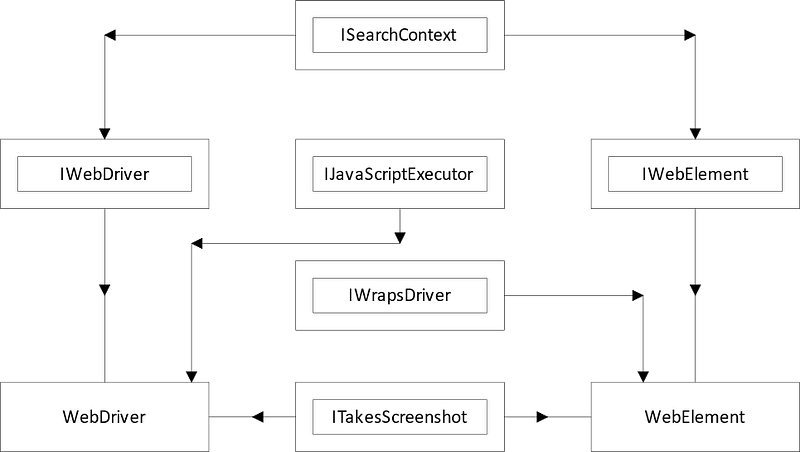
Though this is not a complete diagram but highlights the most important interfaces (in double-rectangles) for developing frameworks. We will see the use of these interfaces in source-code as well. I prefer to implement some of these interfaces in page objects depending on the scenario. I implement ISearchContext and IWrapsDriver in page objects almost every time. This allows us to write a unified set of extensions for page objects, WebDriver or WebElements. This saves a lot of time and creates easy to consume underlying methods. Check the code and see how you can use these techniques in your projects.

Efficient UI Tests
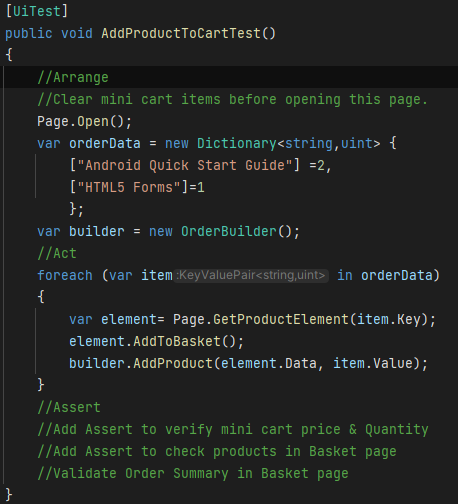
UI tests are the slowest and at the same time important. Our focus should be automating an entire flow in one go, rather than a bunch of partial tests. This reduces a lot of man hours across different team which rely on these tests. I personally prefer AAA (Arrange Act Assert) pattern for writing tests with an empty line in between. This helps to separate the sections of a test scenario and improves readability. Many argue that tests should not have more than 4 or 5 assertions. But does it apply to UI tests too? I don’t think so. API and UI tests are not Unit or Integration tests.
Let’s take the example of customer order flow to clear things up. We want to order some products. While checking the product and product reviews on the shop and product page we will add them to the shopping cart. Once we finish, we will either login first to place an order or place the order if we have already logged in.
We could break the entire scenario into dozens of tests if we want. But we must keep in mind that adding more tests means adding an additional 2–3 mins per test. The best compromise would be adding just enough tests to cover the entire scenario even if the test takes one more minute to execute, it would still be OK. We can have a single test case where we click the proceed to checkout or verify if it is enabled or disabled and add multiple products to the cart and also add discount coupon code. Individual test to cover the edge cases become a second priority depending upon the product or use case.
This works best for in-sprint automation. Just think about how many hours will be saved by the teams concerned (DevOps, Triage, Manual, Automation, Development etc.) per financial year if they get feedback from the test results quickly.
Injecting Page Objects
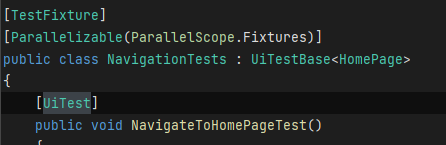
The organization of tests helps in navigating the code easily (if you use proper naming conventions). For that reason, every page will have a separate test class. As you will see in the base test class, we have a Page property and is initialized using the Resolve method of the UITestSession class. This is a good work around if you don’t want to use NUnit lifecycle attributes to initialize the instance of the page in the test classes. The base test class automatically injects the relevant page in the corresponding test class by specifying the generic type argument as shown below.
Feel free to play with the code and let me know what you think.